

PDF – Portable Document Format, one of the most common formats used for presenting, transferring, and printing text-and-graphic content. Almost every printer is capable of printing to this format, but not every program can edit it with its full potential.
In recent years, PDF has taken over most of the possibilities both in printing houses and in transferring editable vector elements, meaning without any loss during scaling.
An interactive PDF, therefore, is a different variation of the standard format, where we can influence the final appearance when saving, printing, or even just for presentation purposes.
I divided PDF interactivity into two categories:
The first is a PDF in the form of a form or brochure with variable data. Here we can fill in empty fields designed for that purpose or make selections by checking single or multiple-choice boxes. This digital form reflects the paper versions of various surveys or applications.
The second is a fully multimedia version of a PDF file. In addition to simple hyperlinks, we can insert various types of animations. We can embed a Google Maps map, add a YouTube or Vimeo video, animate actions, or present them in a specific way within a multimedia presentation.
Both types of PDF formats are worth attention, which is why I will describe both (one now, the other in future posts).
In this post, I focused on the PDF form format. A similar one can be created in Google Forms or with the help of artificial intelligence, but I concentrated on producing this file in Adobe InDesign, which is perfectly suited for this purpose.
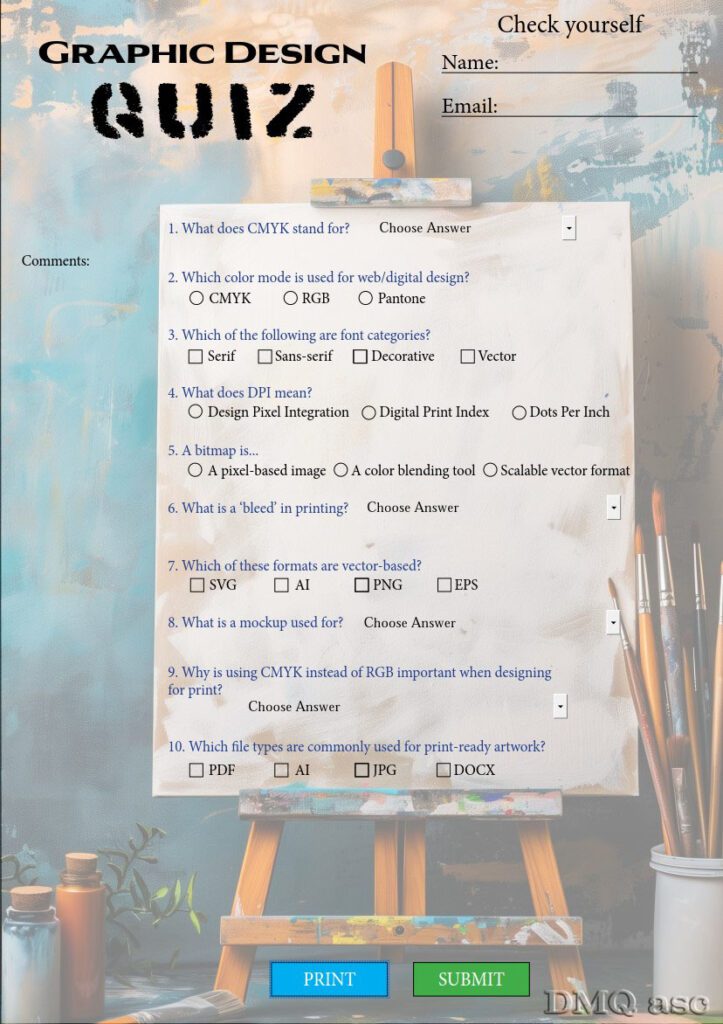
The post contains a PDF in vertical A4 format (210x297mm), where, based on a graphic quiz, I showed 3 main types of form fields. The quiz consists of 10 questions related to graphics and includes dropdown fields, radio buttons, and regular checkboxes.
The dropdown list is shown in questions 1, 6, 8, and 9. Its purpose is to select one answer from several available options. The base label is “Choose Answer,” and only from it do we pick the correct one.
The radio button is shown in questions 2, 4, and 5. It allows selecting one correct answer when all options are visible. It’s impossible to select two at once, as choosing a new one deselects the previous one. The default state contains no selection.
The checkbox is shown in questions 3, 7, and 10. This option allows selecting multiple answers. The default state contains no selection, and it is the only one that may remain unselected in the final version.
Additionally, in this post, I included the possibility of entering your name or contact email. The name is typed into a single-line, non-scrollable text field. The email is entered in a similar way just below.
On the left side, there is a free text field for comments with multi-line support.
Below, there are two buttons: Print and Submit. One allows printing the visible page directly by clicking it and setting the printer output. The other allows sending the file through the mail client installed on your computer. Both buttons are invisible in the printed version, making it possible to hide some elements of the form.
The background of the easel with accessories was created on the MidJourney platform, with a subtle 50% transparent white overlay to highlight the quiz elements.
In this post, I only show a screenshot of the PDF page to present all its elements. However, I am sharing two links here: one shows the possibilities of sharing and coordinating work with clients through comments (disabled in my link, so the view is purely demonstrative).
The second link, on Google Drive, contains the fully functional PDF file that you can download to your computer and test yourself — selecting answers, filling in fields, printing, or sending via email. The email function is linked via the “mailto” command to my business email. I did this because I am curious if there are people who can answer such questions without using the Internet. Generally, for those in the graphics field, they are trivial, but for others, they may be complete mysteries.
So I invite anyone interested to complete the survey. The PDF from Google Drive can be fully opened and edited through your web browser.
A full multimedia PDF will appear in future posts. This version requires Internet access to function properly.
Preview link to Adobe assets:
https://assets.adobe.com/id/urn:aaid:sc:US:0d4d40f1-b98e-4469-9f6e-4ab15457d47f?view=published
Link to the full version of the PDF, available for testing without any obligations:
https://drive.google.com/drive/folders/1YEbfZHBvSqUwnm0clCIn46oGbpuALQoo?usp=sharing
The selected graphics illustrate my ability to transform and enhance the visual effect of a person, object, or landscape based on an original background. The final result is subjective and reflects a given timeframe. Each of us perceives things differently, and each of us has different skills and time resources. Regularly published posts with specific thematic projects are meant to systematically collect materials showcasing graphic possibilities.
Enjoy testing!